# LeoDex
[LeoDex.io](https://leodex.io) is a non-custodial Cross-Chain Decentralized Exchange (DEX) interface that allows users to connect with any crypto wallets and swap native L1 crypto tokens across different blockchains with no intermediary. Using our [WebApp](https://leodex.io), users can swap hundreds of native L1 & L2 assets on dozens of blockchains with dozens of wallet options.
[https://leodex.io/trade/perps](https://beta.leodex.io/trade/perps/BTC_USDC) is our DEX perps trading platform that allows you to trade perps permissionlessly and 100% onchain with low fees and efficient markets.
**LEO** is our ecosystem token and it powers LeoDex, INLEO (Our Onchain Social Media App), LeoAI (Our Onchain "ChatGPT") and LeoBridges. It has a max (fully circulating) supply of 30M tokens and is natively on the Arbitrum Network. 100% of LeoDex Affiliate Fees pay into the "sLEO" contract (Staked LEO) on .
***
## Supported Protocols, Wallets, Assets and Blockchains
**Protocols**
* Thorchain
* ChainFlip
* Near Intents
* Relay
* Maya Protocol
* Rango
* [Ruji Perps](https://leodex.io/trade/perps/BTC_USDC)
**Wallets**
* Keplr
* WalletConnect
* CTRL
* Coinbase
* Trust Wallet
* Metamask
* Talisman
* Keystore
* Ledger
* Vultisig
* TronLink
**Assets**
* Bitcoin (BTC)
* Ethereum (ETH)
* Solana (SOL)
* Litecoin (LTC)
* Dogecoin (DOGE)
* Thorchain (RUNE)
* Thorchain (TCY)
* USDT
* USDC
* Binance USD (BUSD)
* Binance Bitcoin (BTCB)
* DAI
* CACAO
* ChainFlip (FLIP)
* ChainLink (LINK)
* Dash (DASH)
* Wrapped Bitcoin (WBTC)
* Coinbase Bitcoin (CBBTC)
* Base USDC (USDBC)
* Bitcoin Cash (BCH)
* Tron (TRX)
* Avalanche (AVAX)
* Matic (MATIC)
* ... and many more!
**Blockchains**
* Arbitrum
* Avalanche
* Base
* Bitcoin Cash
* Binance
* Bitcoin
* Cosmos
* Dash
* Doge
* Polkadot
* Ethereum
* Fantom
* Gaia
* Iota
* Kujira
* Linea
* Litecoin
* Mayachain
* Oktchain
* Optimism
* Polygon (Matic)
* Solana
* Thorchain
* Tonchain
* Tron
* Radix
**DeFi**
* Perpetual Futures
* Lending (Soon)
# General
{% content-ref url="/pages/B4VS5X8xMTP3Zi3p2KaA" %}
[LEO Token](/general/leo-token)
{% endcontent-ref %}
{% content-ref url="/pages/fhmbW1dksPSgXkkSo9bU" %}
[LEO Staking](/general/leo-staking)
{% endcontent-ref %}
{% content-ref url="/pages/aixqvjQBAv58r0NlPCk2" %}
[Fees](/general/fees)
{% endcontent-ref %}
# LEO Token
[LEO](https://www.coingecko.com/en/coins/bep20-leo) is the utility token of the LEO Ecosystem. INLEO is a SocialFi application that allows content creators and users to distribute LEO rewards on content. [LeoDex](https://leodex.io) is our flagship product and unlocks various new utilities for the token. 100% of affiliate fees generated from LeoDex flows to sLEO stakers on Arbitrum
LEO has been building crypto web apps in the blockchain space for over 6 years now. Our two flagship applications are LeoDex (Cross-Chain DEX) and INLEO (Microblogging on the Blockchain).
### Tokenomics Overview
* **Max Supply:** 30M
* **Circulating Supply (July 2025):** 30,000,000
* **Emissions Rate (July 2025)**: 0 LEO/block (fully distributed via fair launch from 2019 - 2025, no block rewards)
* **Exchange Listings:** [**LEO**](https://leodex.io) **|** [**heLEO**](https://beeswap.dcity.io/swap?input=SWAP.HIVE\&output=LEO) **|** [**bLEO**](https://www.coingecko.com/en/coins/bep20-leo) **|** [**pLEO**](https://www.geckoterminal.com/polygon_pos/pools/0xf8095ffd24f02bd8aedc96e5a3617310815cc4c7?utm_source=coingecko\&utm_medium=referral\&utm_campaign=searchresults)
### What Are the Various Forms of LEO?
* LEO - native LEO on Arbitrum
* bLEO - wrapped LEO on BSC
* pLEO - wrapped LEO on Polygon
* heLEO - wrapped LEO on Hive Engine
### FAQ
**Why Are There Multiple Versions of LEO?**
The different forms of LEO are wrapped versions on various chains. LEO is natively an Arbitrum token. The other tokens are Protocol-operated wrapped versions of LEO that are completely fungible (interchangeable) using our Bridging technology. Our Bridges can be accessed directly on by simply putting 1 form of LEO in the input and the other form you want to go to in the output (same as any other swap). This will bridge LEO from one chain to another. A small fee is incurred and that fee is paid in LEO. 100% of these bridge fees are burned, creating deflation on the LEO supply.
**Do The Different Versions of LEO Have Different Supply Caps?**
The real max total supply of LEO can be seen on the [Arbiscan link for native LEO here](https://arbiscan.io/token/0x93864d81175095dd93360ffa2a529b8642f76a6e). The max supply is 30M tokens and decreases based on Bridging Fee Revenue (100% of bridging fee revenue burns LEO). The other forms of wrapped LEO may have the same or lower supply caps. When LEO is bridged from Arbitrum to BSC, Hive-Engine or Polygon, it is locked in the Oracle on Arbitrum. The Oracle then sends bLEO, heLEO or pLEO to the user's address (whichever form they wrapped to) for them to use LEO on other chains. When they are ready to bridge back, the unwrap bLEO/pLEO/heLEO to native LEO. This locks the bridged LEO back into the Oracle and unlocks the native LEO on Arbitrum back into the user's wallet. Essentially works like WBTC and other wrapped tokens.
**What Are the Oracle Wallets?**
1. Oracle Hot Wallet: *0x56687402dd89d03EE4cABf8A605f020AA0ef780A* (this address is used when users receive native LEO back on Arbitrum after unwrapping).
2. Oracle Cold Wallet: *0x00FD5848Beac00538C6B9ABEB18CEA396aB7D7d1* (this address holds all the locked native LEO that is currently wrapped to other chains. It refills the hot wallet when the hot wallet runs low on LEO for unwraps).
**Can I Earn LEO?**
Yes. You can earn LEO by using INLEO - our Web3 Social Media app. Users earn LEO from what we call a "SIRP" which stands for System Income Rewards Pool. This Rewards Pool pays LEO to content creators/users every single day. The SIRP is funded entirely from buybacks. The INLEO platform earns System Income from Premium, Ads and Creator Subscriptions. This revenue is collected in this [onchain account](https://inleo.io/leopool/wallet/hive-engine) and purchases LEO from the market each day. You can track the daily purchases by following one of our [onchain AI Agents](https://inleo.io/leo.alerts) who tracks the buyback activities in real-time and posts it on Threads.
# LEO Staking
Coming Soon
*Screenshot is placeholder data until the page is live.*
On the new leodex.io/leo page (going live soon) you can stake LEO and earn USDC payouts every single day. 100% of LeoDex Affiliate Fees are paid to the sLEO contract on Arbitrum.
The sLEO contract pays USDC harvests to every LEO staker on a stake-weighted basis.
### FAQ
**Is There a Wait Time to Unstake | Does it Cost Anything to Unstake?**
No, you can unstake at any time for 0 fees.
# Fees
### Affiliate Fees
Our affiliate fee for Thorchain, Maya Protocol, ChainFlip, Rango and Relay is 0.45%. One of the lowest in the industry.
### What Happens to Fee Revenue?
100% of Affiliate Fee Revenue is captured by the sLEO staking contract on Arbitrum as USDC (Arbitrum) and is claimable by every [LEO staker](/general/leo-staking) on a stake-weighted basis.
### Bridging Fees
When LEO is moved across blockchains, a small bridging fee is incurred. This fee is dynamic (usually 1% - 5%) based on market pricing. 100% of bridging fee revenue is burned which makes LEO deflationary each time someone bridges it to another chain.
### Referral Rewards
When a user utilizes our referral program to create a unique ID and share that code with swappers, they get a share of our 0.45% affiliate fee.
* 0.28% to LeoDex
* 0.12% to the user
* 0.05% discount to the swapper
# LeoDex Perps
One of the first fully onchain and decentralized perpetual futures exchanges on the market. Trade the next-generation of perps exclusively on LeoDex!
Perpetual Futures (Perps) have become the new talk of this crypto cycle. With the amazing rise of Hyperliquid and the recent launch of CZ-backed-perps platform called "AsterDEX", we're seeing an incredible race to market to see who can build the best UI/UX.
The key differentiator is how decentralized these perps truly are. With LeoDex, we wanted to launch with the most decentralized perps product possible. This is why we chose to launch exclusively with Rujira Network perps from the THORChain Ecosystem.
> Trade LeoDex Perps NOW ->
RUJI Perps are built on the THORChain network and they utilize THORChain's deep cross-chain liquidity as the backbone for Perps Trading. Securing assets on the network via the fully decentralized node ecosystem that has been running THORChain flawlessly for years.
[LeoDex Perps](https://leodex.io/trade/perps/BTC_USDC) leverage these tools to bring you the **most decentralized, onchain perps experience** that is available today.
**The LEO Mission is to democratize financial knowledge and access**. Releasing Perps trading on our DEX is a MAJOR leap in this direction of democratizing access to finance. The average retail user doesn't have access to things like Perps and with new onchain solutions like Rujira on THORChain, LeoDex is proud to be the first interface to bring you this experience.
***Important PSA:** Today's LeoDex Perps launch is V1 Open Beta. Please use it as such. Try with small amounts. Play and have fund with them. If you don't know how Perps work, please research before using the Perps experience on LeoDex. Perps carry greater risk than spot trading as it utilizes 4x margin and can liquidate you instantly if you are inexperienced.*
Our Perps UI is in early access Open Beta. Please give us your feedback [Via Discord](https://discord.com/invite/8TEthdTmnZ) so that we can improve the Perps Experience going forward! We hope to see you testing and giving feedback so we can make the best experience imaginable.
### Introducing LeoDex Perps | Trade Perpetual Futures on LeoDex
### How to Trade Perps on LeoDex
To trade perps on LeoDex, we recommend the Keplr Wallet. Keplr is incredibly intuitive and easy to use. The second best choice in our opinion is a Keystore Wallet.
**1). Go to the Perps UI**
Navigate to the Perps UI on LeoDex using the main menu on LeoDex or [directly via this link](https://leodex.io/trade/perps/BTC_USDC).
**2). Deposit Collateral**
Remember: LeoDex Perps are fully onchain and decentralized. When you "Deposit" you are actually securing USDC on the THORChain network. This turns your ETH.USDC (for example) into Secured USDC on THORChain. This secured USDC can then be used for Perps trading.
**3). Choose a Network and Amount**
Choose a network and then type an amount that you want to secure onto THORChain's network to use for Perps trading. You'll need USDC in your wallet for one of the chosen networks before doing so. We recommend using ETH.USDC for this part. Then click "Deposit USDC".
**4). Wait About 30 - 60 Seconds**
It can take about 30-60 seconds for secured USDC to appear in your wallet and materialize on the LeoDex Frontend. If it doesn't automatically show in your balance on the right side of the screen, then refresh the page (or go to a different page and come back to the Perps page).
**5). Once You Have Collateral, Open Your First Position**
Remember: Perps trading is highly volatile and is likely to lead to a loss of all your collateral. Whether you're new or experienced in Perps trading, you should try small amounts and only risk what you're willing to lose.
In this example, I'll open a long XRP position:
1. Select The [XRP/USDC Market](https://leodex.io/trade/perps/XRP_USDC)
2. Enter a Limit Price (or use Market Order to just fill it at the market)
3. Set a Quantity for the trade (this is the total USDC amount of XRP you want to trade)
4. Determine Leverage (the max leverage is currently 4x. This will rise as the Perps market grows on THORChain. You can set leverage to either 1x, 2x, 3x or 4x currently)
5. Click Open Long
After clicking Open Long, you'll see a confirmation window. Once you like all the details, hit "Open Long" and it will create your position.
Note: since LeoDex Perps are fully onchain, it can take up to 30 seconds for your position to appear on the frontend. Just scroll down to Open Positions and wait about 30-60 seconds and the page will automatically refresh to show you your position.
### Tracking Open Positions
Now that you've opened a Perps Position, you can track it in the Open Positions section at the bottom of the page.
Here, you can see the XRP/USDC Long that we just opened. The position size is $40 which has a notional size of 14.44 XRP.
Our average entry was $2.77 USDC per XRP and the current price of XRP is $2.73.
The collateral used for this trade (USDC from our wallet) is $10 USDC. Our unrealized PnL is $0.059 which is the same amount as the fees we paid (since we just opened this position).
### Editing a Position
Editing your Perps position can get deep into the weeds of mechanics. We will briefly show this but if you want a more full tutorial on position editing, view [Our Docs](https://leodex.inleo.io/) or reference the glossary of terms in this post.
You can adjust 4 things:
1. The collateral used in your trade (or notional size of the trade)
2. The Leverage you're using
3. The Take Profit price of your trade
4. The Stop Loss price of your trade
### Closing a Position
To Close a position and either realize a loss/gain, click "Close" to the right of that position. This will show you a confirmation window with all the key details. If everything looks right to you, click "Close Position" and it will close your perps trade at the market.
### Withdrawing
You can withdraw available collateral at any time. Remember: all USDC is on the THORChain network and is inside of your own wallet. LeoDex NEVER has access to your funds. You can Withdraw (aka Unsecure) your USDC from the THORChain network using the Withdraw button on LeoDex. This will send a memo to the THORChain network with your secured USDC to unsecure it back to ETH.USDC inside of your wallet.
### Ready to Leap Into the Future With LeoDex?
The market has been waiting for fully onchain and decentralized perps that gives the UI/UX of a CEX. This is what LeoDex has built thanks to the Rujira x THORChain-powered backend of Perps onchain.
LeoDex Perps are one of the first fully onchain and decentralized perps markets on the planet. We are proud to be on the bleeding edge of markets.
Since this technology is so new - both our frontend and the backend of THORChain Perps on Rujira - please be mindful of the disclaimer at the bottom of the page: utilize this carefully and if you are inexperienced with perps, you are at risk of losing any USDC you put into a perps position.
As always, comment below or jump into our Discord with any questions or feedback.
V1 Open Beta for LeoDex Perps is now LIVE! We'd love for you to try it and give your candid feedback on how we can improve it.
Try Perps on LeoDex ->
### Key Terminology:
1. Funding Rate = the cost of capital. If you are long or short, there is a peer-to-peer funding rate that must either be paid (or get paid to you). Check the Funding Rate display on LeoDex for the current Funding Rate of any long/short asset position. Funding rates pay every 8 hours and are dynamically changing based on P2P position sizing
2. Collateral = the amount of USDC you post as margin for a trade. This is your total amount at risk
3. Deposit = on LeoDex, depositing means "Securing" your assets on the THORChain network. LeoDex does not ever have access to capital. We are merely an interface for Perps on THORChain via Rujira Network. When you deposit USDC, you are actually securing it on the network as secured USDC inside of your own wallet
4. Withdraw = as said in the part above, deposits are always inside of your own wallet. You can withdraw (aka unsecure) your assets from the THORChain network and get your USDC back as Ethereum USDC at any time by using the Withdraw button
5. Active Collateral = the total amount of collateral you have across all your positions
6. Available Collateral = total collateral you have available for new positions
7. Limit order = place an order at a predefined price
8. Market order = place an order that fills at the market price
9. Quantity = the size of your trade. For example, if you do $100, then your trade size will be $100 (after leverage). The margin (collateral) used if using 4x leverage = $25 on this example trade
10. Borrow Fee = the amount of USD you pay or get paid for holding a position (based on funding rate)
11. Trade Fee = the cost of opening a trade
12. Long = opening a position that wins if the asset goes up
13. Short = opening a position that wins if the asset goes down
14. SL or Stop Loss = a stop loss automatic exit price if your losses reach a predefined amount
15. TP or Take Profit = an automatic exit price if your gains reach a predefined target
16. Notional Size = the size of the position in terms of the asset you're trading (i.e. "56.75 DOGE" = a position size representing 56.75 DOGE coins)
17. Entry Price = the price when you executed the trade
18. Fair Price = the current market price\
19 Liquidation Price = the price at which your position would be liquidated and you lose 100% of your collateral
# Web App
{% content-ref url="/pages/L00quTUWylm5bjQJtt56" %}
[Features](/web-app/features)
{% endcontent-ref %}
# Features
{% content-ref url="/pages/ZKiGvd16mS2wAgKn2XLx" %}
[Swaps](/web-app/features/swaps)
{% endcontent-ref %}
{% content-ref url="/pages/RAgcW8xLEizDI0l9dtOf" %}
[Dashboard](/web-app/features/dashboard)
{% endcontent-ref %}
{% content-ref url="/pages/hjCpaNFgUGjZYZuauZQH" %}
[Multi-Wallet Support](/web-app/features/multi-wallet-support)
{% endcontent-ref %}
{% content-ref url="/pages/SvqqfjCiebzYY0ij16X0" %}
[Referrals](/web-app/features/referrals)
{% endcontent-ref %}
{% content-ref url="/pages/p1Mq3OA1eUVr6QWEBkKa" %}
[Swap Account](/web-app/features/swap-account)
{% endcontent-ref %}
# Swaps
Cross-Chain Swaps, Clean and Simple
A simple, intuitive and clean approach to cross-chain asset swapping with no intermediaries and full self-custody. LeoDex supports all of the major CrossChain trading routes, displaying each route in order based on how fast and how cheap it will be to use each protocol. From here, you choose which route makes the most sense for your goals (faster or cheaper) and click swap to complete it.
Asset Selector: Default Sorted By Balance With Search Capabilities & Sort By Network
## Supported Protocols, Wallets, Assets and Blockchains
**Protocols**
* Thorchain
* Maya Protocol
* ChainFlip
* Rango (Aggregator)
* Relay (Aggregator)
* Near Intents (Coming Soon)
* HyperLiquid (Coming Soon)
* Rujira Perps (Coming Soon)
**Wallets**
* CTRL
* Coinbase
* Trust Wallet
* Metamask
* Talisman
* Keystore
* Ledger (Soon)
* Vultisig (Soon)
**Assets**
* Bitcoin (BTC)
* Ethereum (ETH)
* Solana (SOL)
* Litecoin (LTC)
* Dogecoin (DOGE)
* Thorchain (RUNE)
* USDT
* USDC
* Binance USD (BUSD)
* Binance Bitcoin (BTCB)
* DAI
* CACAO
* ChainFlip (FLIP)
* ChainLink (LINK)
* Dash (DASH)
* Wrapped Bitcoin (WBTC)
* Coinbase Bitcoin (CBBTC)
* Base USDC (USDBC)
* Bitcoin Cash (BCH)
* Tron (TRX)
* Avalanche (AVAX)
* Matic (MATIC)
* ... and many more!
**Blockchains**
* Arbitrum
* Avalanche
* Base
* Bitcoin Cash
* Binance
* Bitcoin
* Cosmos
* Dash
* Doge
* Polkadot
* Ethereum
* Fantom
* Gaia
* Iota
* Kujira
* Linea
* Litecoin
* Mayachain
* Oktchain
* Optimism
* Polygon (Matic)
* Solana
* Thorchain
* Tonchain
* Tron
* Radix
# Dashboard
Welcome to your [LeoDex Dashboard](https://leodex.io/dashboard). The Dashboard is designed to feel like CEX but operate on DEX. You are fully in control of your wallet and your assets. Our Dashboard is designed to help you track & manage your assets in one place.
**Key Features:**
1. Daily PnL
2. Asset Allocation Pie Chart
3. Balance Change Over Time
4. Key Account Statistics
5. Asset Holdings
6. Transaction History
# Multi-Wallet Support
LeoDex.io supports multiple wallet connections simultaneously. Once connected with multiple wallets, you can swap between assets and wallets seamlessly. This makes it very intuitive to swap assets across many chains and many different providers without needing multiple interfaces / wallet connections / tabs open.
View a Demo of Multi-Wallet Support [Here on X](https://x.com/leodexio/status/1911601142083023271).
# Referrals
Invite Friends to Get 33% Commission
The [LeoDex Referral](https://leodex.io/referrals) Program allows you to create a unique referral code and earn \~1/3rd of our total affiliate fee. LeoDex charges 0.45% as an affiliate fee on all swaps (one of the lowest in the industry) and when someone uses your referral code, the split becomes:
1. 0.28% to LeoDex
2. 0.12% to You
3. 0.05% discount to the swapper
### How It Works
How it works is simple - you create a unique referral ID. That referral ID is then utilized when you refer a user.
When you refer a user and they make their first swap, their public address is now shown as a referral to your unique ID on LeoDex's Referral Dashboard.
Once tied, that referral's affiliate fees are **permanently** tied to your Referral ID. Which means that anytime they come back to LeoDex to swap in the future, you also get credit for those swaps and earn your 1/3rd share of LeoDex's affiliate fees (even if they don't return using your link / ref ID).
### Where Are Affiliate Fees Pooled Before Distribution?
The system we created splits our affiliate fee to two separate addresses when a user swaps using a referral link:
1. The main LeoDex affiliate address - "leo"
2. A new LeoDex Referral-specific affiliate address - "lref"
0.28% gets sent to "leo" and 0.12% gets sent to "lref" on referred swaps. The Referral portion of the affiliate fee is pooled in the lref address until the next distribution.
### How Often Are Payouts?
Payouts happen on the 1st and 15th of every single month. They are fully autonomous.
You can see the next payout date on your Referral Dashboard.
### What Do I Earn?
Affiliate fees are paid to referrals in like-kind - which means that what you earn depends on what your referral swapped:
* For Thorchain Swaps, you earn RUNE
* For Maya Protocol Swaps, you earn CACAO
* For ChainFlip Swaps, you earn USDC
The beauty is that you only have 1 unique Referral ID. So you refer in swappers and it doesn't matter if they do 3 swaps on ChainFlip and then 4 swaps on Thorchain and 1 swap on Maya... you'll earn your referral fees in the 3 different cryptos that get paid based on those referrals.
### How to Create a Referral ID
To create a referral ID, simply connect your wallet to [https://leodex.io](https://leodex.io/) and then click on the Referrals tab or head directly to .
You'll be prompted to create a unique referral ID.
**Tip:** Referral IDs are a unique code. Once someone else creates a referral ID, you cannot make the same ID. For this reason, we recommend claiming your referral ID sooner than later!
### How to Share a Referral ID
*share your referral link and it will automatically populate the Ref ID field | or manually enter your ref ID*
Two ways to share your ref ID:
1. Link - available in your dashboard or by editing the ref ID at the end of this link
2. Ref Code - a user can hit "options" when inputting a swap and manually enter your ref code - think of this like a "Creator ID" used on other platforms to designate who referred you
# Swap Account
A step function leap in the accessibility of cross-chain swapping. Allows users to swap with nothing but a QR code (no wallet connection even required). If you can send it, you can swap it
{% embed url="" %}
With Swap Accounts, we aimed to tackle one of the biggest issues in Cross-Chain: Wallet connectivity, seamless user experience and asset flexibility.
### What is a Swap Account
A Swap Account is effectively a Keystore wallet that is created in your browser. The way we've built ZEC swaps using Swap Accounts is that the Keystore acts as a temporary, throw-away after one use wallet.
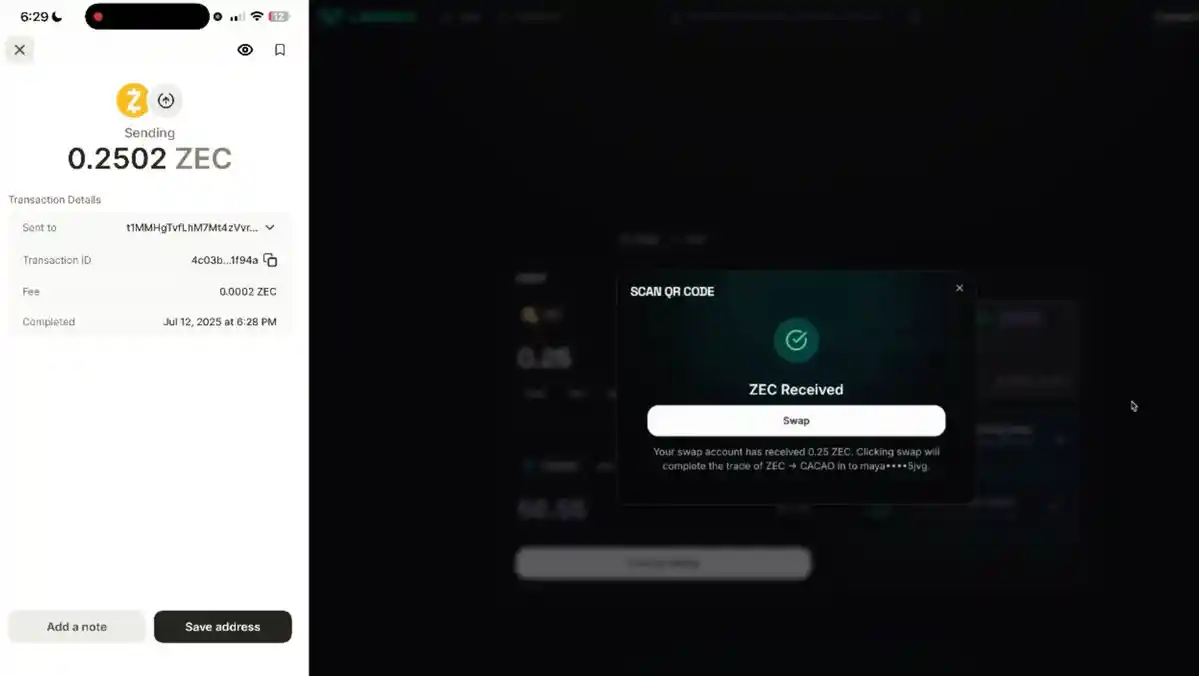
When you initiate a swap, you enter a recipient for your output asset. Then, a Keystore is generated for you. You scan the QR code (or manually send) to send ZEC to the temporary Keystore account (a.k.a. Swap Account).
LeoDex then monitors the blockchain and once your ZEC arrives (usually in seconds or minutes), you are prompted with a "Swap" button.
Clicking "Swap" then swaps from your Swap Account into the pre-selected asset you chose to receive and into the recipient address you entered.
The UX this creates is flawless and super enjoyable. From your POV, you are scanning a QR code and simply sending ZEC to an address then clicking one button afterwards to complete the swap.
Please note that this is an experimental feature and there are also risks involved with Swap Accounts.
**Treat a swap account as if it is the hottest of hot wallets. Your goal should be to minimize the time your ZEC is "exposed" (and yes, we would say your ZEC is exposed) inside this hot wallet.**
The Swap Account is a 1x use wallet that is created in your browser. You are not meant to re-use it and you are DEFINITELY not meant to hold ANY funds in there beyond the 10 seconds it takes you to see that ZEC was received and LeoDex prompts you to complete the swap.
If you are uncomfortable with how this works or the risks involved, we ask that you don't use the QR2Swap feature and proceed to use ZEC swaps normally (by connecting whichever wallet you use for ZEC and doing the swap with full self-custody).
LeoDex never has access to the mnemonic of your Swap Account and if any funds are lost, it is entirely your responsibility. Only you (your browser) has the mnemonic phrase for the Swap Account's private keys. Please understand this and beware of the disclaimers (we require you check a box acknowledging all of this information prior to using a Swap Account to do a QR2Swap).
### FAQ
**Does LeoDex Have Access to the Swap Account?**
No. LeoDex never has access to your Swap Account. It is a temporary, one-time-use Keystore account that is generated inside of your browser. After you use it for one swap, the mnemonic is deleted from your browser.
**What Happens if I Leave or Close my Browser During a QR Swap?**
We recommend leaving your browser window open and untouched during a QR Swap (it takes less than 60 seconds). If you do close the tab or browser for any reason, we've created a "Continue with Swap" button that will pick up where you left off so your funds are not lost.
**Are Swap Accounts Safe?**
We like to think of Swap Accounts as being similar to a burner cell phone. You get one to make a single call and then you toss it in the trash afterwards. It's not intended to be a long-term use feature. Swap Accounts simplify the UX and also allow for Shielded ZEC swaps. You should never send ZEC to a swap account after the first use. One and done. While in the process of a swap, you should consider your funds as being "in a hot wallet" and your goal should be to complete the swap and move those funds back to your more secure wallet ASAP.
### Support or Other Questions?
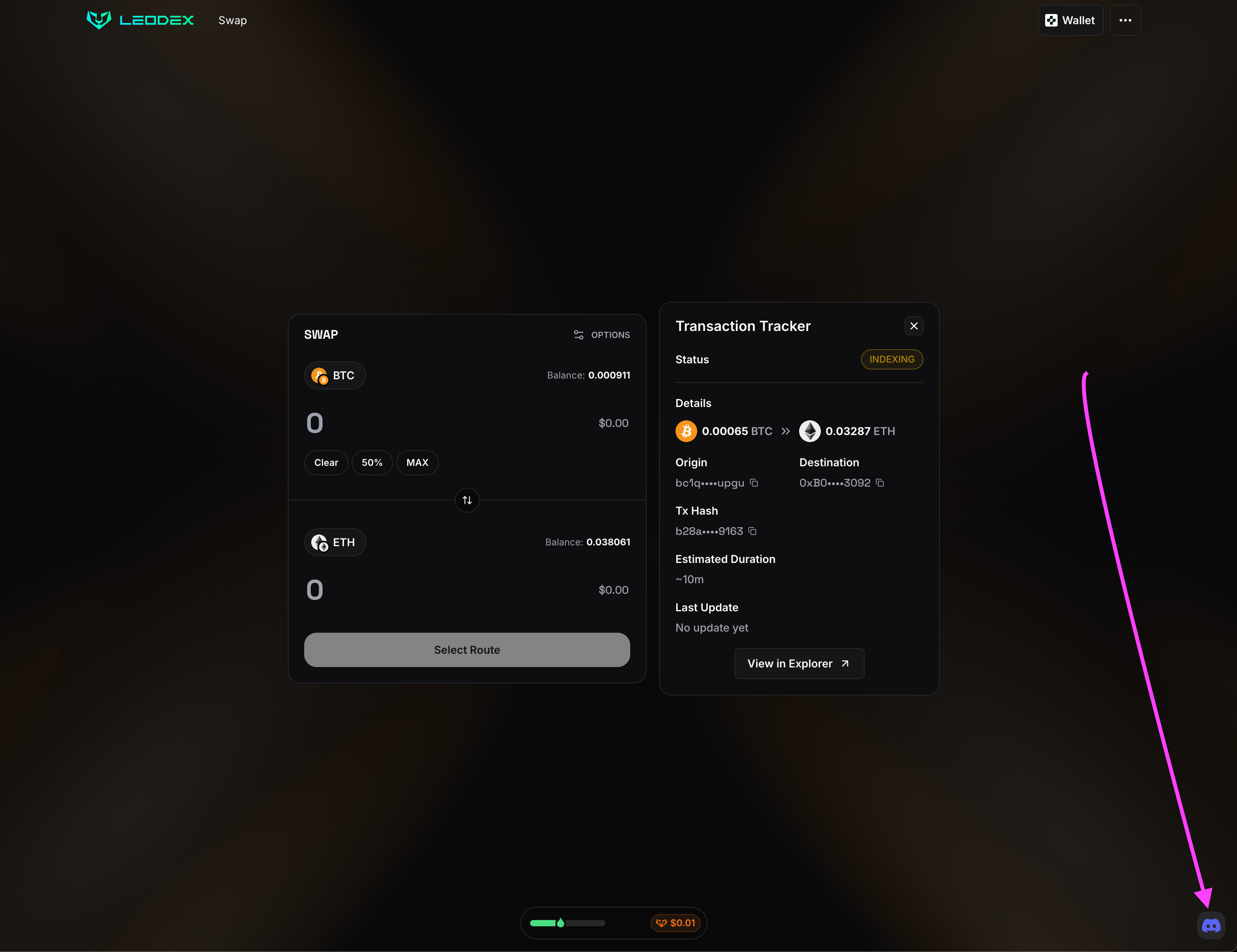
Please use the Discord icon on LeoDex or [Click Here](https://discord.com/invite/8TEthdTmnZ) to visit our Discord and open a support ticket for official assistance. The LeoDex team & community will never reach out to you for tech support outside of a ticket.
# Instant Swap
Powered by THORChain's Memoless Swap Feature, Instant Swap Allows You to Swap With NO WALLET Connected to LeoDex. Simply Open a Deposit Channel and Swap THORChain Native Assets
LeoDex.io
Instant Swaps allow users to swap on THORChain using leodex.io with **no wallet connected**. LeoDex is the first and currently the only interface that has introduced this swapping capability and we have dubbed them "Instant Swap".
**Instant Swaps are LIVE. Try them on** [**LeoDex.io**](https://leodex.io/)**!**
### **How It Works**
Instant Swaps on THORChain via LeoDex use a new protocol-level feature called "Memoless Transactions". In November 2025, [THORChain released an update](https://blog.thorchain.org/new-features-on-thorchain-limit-orders-memoless-transactions/) that enabled Memoless Transactions on the protocol.
Memoless Transactions enable interfaces (like LeoDex!) to predefine the memo for a swap. "Memos" are used to instruct THORChain's protocol on what to do with your assets (swap them for another asset, pool them, etc.).
Instant Swaps on LeoDex utilize Memoless Transactions by:
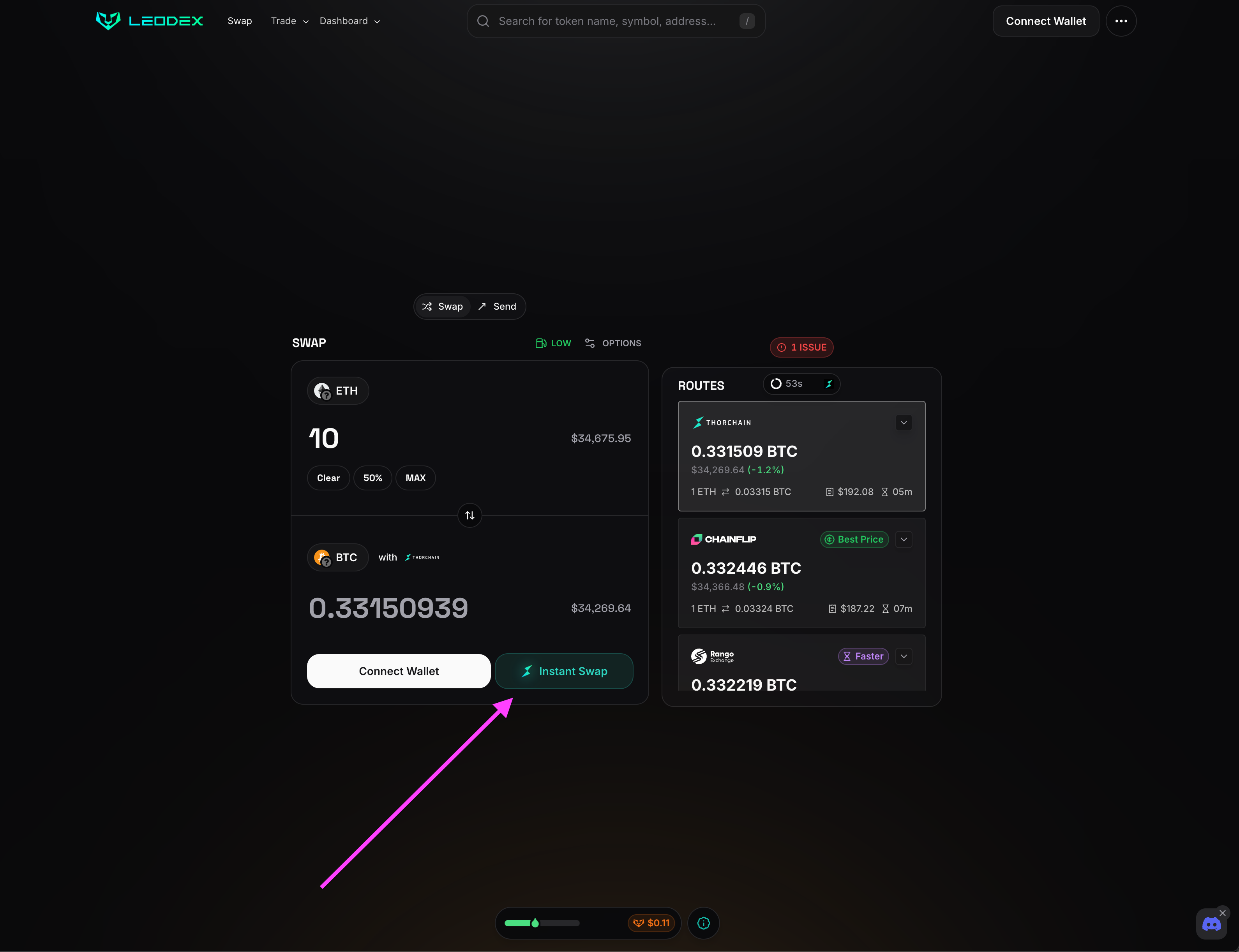
1. Allowing you to go to leodex.io and fill out a swap (10 ETH -> 1 BTC, for example)
2. LeoDex writes the memo for you and tells it to THORChain while attaching a "Reference ID" to your swap
3. You send your swap to the proper THORChain Address with the corresponding Reference ID
4. Your swap is processed and sent to your chosen recipient address (set by you when starting your swap)
### How to Do an Instant Swap on THORChain
\*\*1). To perform an instant swap on THORChain, go to ;
Select any supported asset (assets listed below: as of right now, most native assets are supported and THORChain is working to integrate more assets like ERC20s. When those are available for memoless TXs, LeoDex will automatically support them for instant swaps).
**2). Click Instant Swap (next to the connect wallet button)**
You do NOT need a wallet connected to do an instant swap! You just need to click the button and enter a destination address (your receiving wallet).
**3). Enter Your Destination Address and Click "Create Deposit Address"**
This part is very important. Ensure you've accurately set your Destination Address (your receiving wallet for the BTC in this swap example). Setting the wrong address will lead to a loss of funds.
You'll then see LeoDex directing THORChain to generate your Deposit Address.
**4). Send ETH (or Chosen Swap Asset)**
After the Deposit Address is generated by THORChain, you are then prompted with 3 things:
1. An Amount
2. A QR Code
3. A Deposit Address
You can now proceed with sending ETH.ETH (or whatever chosen crypto asset) to this deposit address using ANY Ethereum Wallet (remember: Instant Swaps allow you to use any crypto wallet to swap to any crypto asset. There are no restrictions).
***Please ENSURE that you send the EXACT amount to the EXACT address**. Memoless Transactions require an exact amount. In this case, its asking us for 10.00000088 ETH... Sending 10.00000087 ETH can result in a refunded TX or worst case: a loss of funds. Ensure your amount and deposit address are 100% accurate.*
**5). Instant Swaps Are ... Instant**
After sending your ETH (or whatever chosen swap asset), you'll see the LeoDex page update almost instantaneously with the Success message. This message indicates that your ETH (or chosen swap asset) has been received and is now being processed into BTC (or chosen output asset).
The success message will happen in seconds. The THORChain swap part will depend on the swap queue on THORChain and the size of your swap. Typically, this will happen in a few seconds or a few minutes (same as any other THORChain Swap).
Congratulations! You just swapped crypto with **NO WALLET CONNECTED.**
### Instant Swap Supported Assets
As of November 2025, Instant Swap supports the following assets (more will be integrated by THORChain's Memoless TXs and therefore autonomously supported by LeoDex's Instant Swap feature in the coming weeks and months):
1. BTC
2. ETH
3. BCH
4. BNB (BSC)
5. DOGE
6. LTC
7. AVAX
8. XRP
9. ATOM
10. TRON (TRX)
11. ETH (Base)
# ☎️ Support
In the bottom right of LeoDex, you'll find a "[Discord](https://discord.gg/8TEthdTmnZ)" Icon. Clicking it will invite you to the LEO Discord Server where you can get support from the community & team.
# 🗺️ Roadmap
Design - Release - Iterate - Scale | We Pride Ourselves on Innovating Relentlessly and Products That Are Built to Last
The LEO Team moves rapidly to iterate new releases. The following screenshot is from our new /leo page on LeoDex and shows our overarching roadmap of what we aim to achieve. Along this big picture roadmap, we develop, release and iterate quickly. [Following us on X](https://x.com/leodexio) is the best way to get real-time updates about what we're doing now and in the future.
1. LeoDex Web App
2. LeoMerchants
3. LeoKit
4. LeoDex Mobile Wallet App
100% of LeoDex Revenues from these 4 applications flows to the sLEO staking contract on Arbitrum and can be harvested daily by LEO Participants. Learn more at .
*Keep in mind the rapid pace of LeoDex development. We don't update these docs regularly so it is likely that by the time you're reading this, many new things have been shipped by the team. Again, Following us on X will give you the best real-time updates & roadmap.*
***
Follow [@leodexio on X](https://x.com/leodexio). We post all of our updates in real-time there and push new features, improvements and integrations to every single week.
# 📸 Media Kit
PNG
Artboard
Logo + Text
Text Only
## SVG
Text Only
Logo + Text
### LEO Token Icon (PNG)
# Tutorials
# How to Swap ZEC With Only a QR Code
How to swap ZEC (Shielded or Transparent)
{% embed url="" %}
This community tutorial shows you how to swap ZEC (Shielded or Transparent) using LeoDex.io's Maya Protocol routes.
### 1). Enter the Details of Your Swap
Enter ZEC in the input or output. If using the QR 2 Swap with no wallet feature, you can only swap FROM ZEC.
### 2). Paste Your Recipient Address
This is the address you want to receive the output coin to. It should be a wallet that YOU own. In this example, I chose "CACAO" so I inputted my Maya address.
*Note: Read Disclaimers and Check the Box Before Proceeding*
### 3). After Clicking "Generate QR Code", Scan the QR Code
Scan the QR code using whichever ZEC wallet you want. I used Zashi Mobile App to do this Maya Protocol swap in this example.
### 4). LeoDex Will Now Monitor the Blockchain and Await for Your ZEC to Arrive into Your Swap Account
### 5). Once It's Arrived (Usually 30 Seconds - 2 Minutes), Click Swap
This completes the swap from your Swap Account to your chosen output. In this case, CACAO to my Maya Address.
### 6). Done!
About 1 second later, LeoDex will give you a Transaction Tracker. You are now DONE. It's that easy. Click on "View in Explorer" to track the status of your swap. Depending on the swap size, it only takes a few minutes to arrive as your chosen output asset (CACAO in this example).
### What is Supported?
You can swap ZEC to any of the following L1 assets completely permissionlessly thanks to LeoDex.io's support of Maya Protocol Routes:
1. BTC
2. ETH
3. USDT
4. USDC
5. ARB
6. DASH
7. RUNE
8. CACAO
9. ... and many more!